martes, 28 de abril de 2015

"Evil Maid" Attacks on Encrypted Hard Drives


Earlier this month, Joanna Rutkowska implemented the "evil maid" attack against TrueCrypt. The same kind of attack should work against any whole-disk encryption, including PGP Disk and BitLocker. Basically, the attack works like this:

Step 1: Attacker gains access to your shut-down computer and boots it from a separate volume. The attacker writes a hacked bootloader onto your system, then shuts it down.

Step 2: You boot your computer using the attacker's hacked bootloader, entering your encryption key. Once the disk is unlocked, the hacked bootloader does its mischief. It might install malware to capture the key and send it over the Internet somewhere, or store it in some location on the disk to be retrieved later, or whatever.

You can see why it's called the "evil maid" attack; a likely scenario is that you leave your encrypted computer in your hotel room when you go out to dinner, and the maid sneaks in and installs the hacked bootloader. The same maid could even sneak back the next night and erase any traces of her actions.

This attack exploits the same basic vulnerability as the "Cold Boot" attack from last year, and the "Stoned Boot" attack from earlier this year, and there's no real defense to this sort of thing. As soon as you give up physical control of your computer, all bets are off.

    Similar hardware-based attacks were among the main reasons why Symantec’s CTO Mark Bregman was recently advised by "three-letter agencies in the US Government" to use separate laptop and mobile device when traveling to China, citing potential hardware-based compromise.

PGP sums it up in their blog.

    No security product on the market today can protect you if the underlying computer has been compromised by malware with root level administrative privileges. That said, there exists well-understood common sense defenses against "Cold Boot," "Stoned Boot" "Evil Maid," and many other attacks yet to be named and publicized.

The defenses are basically two-factor authentication: a token you don't leave in your hotel room for the maid to find and use. The maid could still corrupt the machine, but it's more work than just storing the password for later use. Putting your data on a thumb drive and taking it with you doesn't work; when you return you're plugging your thumb into a corrupted machine.

The real defense here is trusted boot, something Trusted Computing is supposed to enable. But Trusted Computing has its own problems, which is why we haven't seen anything out of Microsoft in the seven-plus years they have been working on it (I wrote this in 2002 about what they then called Palladium).

In the meantime, people who encrypt their hard drives, or partitions on their hard drives, have to realize that the encryption gives them less protection than they probably believe. It protects against someone confiscating or stealing their computer and then trying to get at the data. It does not protect against an attacker who has access to your computer over a period of time during which you use it, too.

TPM Vulnerabilities to Power Analysis and An Exposed Exploit to Bitlocker

Power analysis. a side channel attack. can be used against secure devices to non?inyasiyely
extract protected information such as implementation details or secret keys. We have
employed a number of publically known attacks against the ELSA found in TPMs from ?ve
different manufacturers. We will discuss the details of these attacks and provide insight into how priyate
TPM key information can be obtained with power analysis. In addition to conventional wired power
analysis. we will present results for extracting the key by measuring electromagnetic signals emanating
from the TPM while it remains on the motherboard. We will also describe and present results for an
entirely new unpublished attack against a Chinese Remainder Theorem implementation of ELSA that
will yield private key information in a single trace.

The ability to obtain a private TPM key not only provides access to data.
but also enables us to circumvent the root?of?trust system by modifying expected digest values in sealed
data. We will describe a case study in which modi?cations to Microsoft's Eitlocker metadata
preyents software?level detection of changes to the BIDS.

Don’t Want Your Laptop Tampered With?


If you’re traveling overseas, across borders or anywhere you’re afraid your laptop or other equipment might be tampered with or examined, you’ve got a new secret weapon to improve security. Glitter nail polish.

Don’t laugh. It works.

Security researchers Eric Michaud and Ryan Lackey, making a presentation at the Chaos Communication Congress on Monday, highlighted the power of nail polish – along with metallic paints and even crappy stickers – to help people know when their machines have been physically tampered with and potentially compromised.

“Government agencies have so much money, they can build their own custom procedures,” said Ryan Lackey, founder of the CryptoSeal VPN service. “But if you’re a private person who travels to a country to do work, you have to take your stuff.”

Physical tampering with machines, whether by governments, corporate competitors or data thieves looking for bounty, is a growing problem. Businesspeople traveling to China in particular have reported problems with data theft and hardware tampering. While drive encryption, strong passwords and software-based measures might keep causal thieves out, traveling offers many ways for prying eyes to physically compromise a laptop, Lackey and Michaud noted. Border areas can be especially dangerous, as authorities can confiscate a laptop or cell phone to “examine” it, then return it with the drives imaged or malware installed. Once at a destination, many travelers lack the option to carry their laptop at all times. This raises the risk of attackers breaking into a hotel room to steal data or compromise machines.

Short of keeping a machine with you 24/7, there is little you can do to be absolutely sure these things don’t happen, the researchers said. If there is a serious question, they advise against traveling with sensitive data and wiping or simply discarding potentially compromised devices upon returning home. But those extreme measures don’t help you while you’re actually on the road, making it critical to know if your machine has been compromised.

Some travelers affix tamper-proof seals over ports or chassis screws. But these seals can in fact be replicated or opened cleanly in minutes by anyone with even minimal training, Michaud and Lackey said. They instead advise borrowing a technique from astronomers called blink comparison. Here’s where the glitter comes in.

The idea is to create a seal that is impossible to copy. Glitter nail polish, once applied, has what effectively is a random pattern. Once painted over screws or onto stickers placed over ports, it is difficult to replicate once broken. However, reapplication of a similar-looking blob (or paint stripe, or crappy sticker) might be enough to fool the human eye. To be sure, the experts recommend taking a picture of the laptop with the seals applied before leaving it alone, taking another photo upon returning and using a software program to shift rapidly between the two images to compare them. Even very small differences – a screw that is in a very slightly different position, or glitter nail polish that has a very slightly different pattern of sparkle – will be evident. Astronomers use this technique to detect small changes in the night sky.

By taking the picture with a cellphone that is kept with you at all times, you can be reasonably sure the original picture hasn’t been tampered with or replaced. In order to guard against typical user forgetfulness, the experts recommend using a two-stage remote verification system. Such a tool would require that two pictures match exactly, for example, before allowing the user to log in to a potentially vulnerable system such as a VPN.

“This makes it non-skippable by users,” said Michaud, CEO of Rift Recon. “If the user doesn’t do the check, it doesn’t work.”

The pair said they will within a few months release an inexpensive tool that will support this two-step verification system. Such machine-assisted verification was necessary to help travelers overcome their own mistakes, they argued.

“Users are lazy,” Michaud said. “It’s really unlikely that we’re going to build a system based on users making the correct security decisions all the time.”

Digital security isn’t about which tools you use; rather, it’s about understanding the threats

There is no single solution for keeping yourself safe online. Digital security isn’t about which tools you use; rather, it’s about understanding the threats you face and how you can counter those threats. To become more secure, you must determine what you need to protect, and whom you need to protect it from. Threats can change depending on where you’re located, what you’re doing, and whom you’re working with. Therefore, in order to determine what solutions will be best for you, you should conduct a threat modeling assessment.

When conducting an assessment, there are five main questions you should ask yourself:

  1. What do you want to protect?
  2. Who do you want to protect it from?
  3. How likely is it that you will need to protect it?
  4. How bad are the consequences if you fail?
  5. How much trouble are you willing to go through in order to try to prevent those?
When we talk about the first question, we often refer to assets, or the things that you are trying to protect. An asset is something you value and want to protect. When we are talking about digital security, the assets in question are usually information. For example, your emails, contact lists, instant messages, and files are all assets. Your devices are also assets.
Write down a list of data that you keep, where it’s kept, who has access to it, and what stops others from accessing it.
In order to answer the second question, “Who do you want to protect it from,” it’s important to understand who might want to target you or your information, or who is your adversary. An adversary is any person or entity that poses a threat against an asset or assets. Examples of potential adversaries are your boss, your government, or a hacker on a public network.
Make a list of who might want to get ahold of your data or communications. It might be an individual, a government agency, or a corporation.
A threat is something bad that can happen to an asset. There are numerous ways that an adversary can threaten your data. For example, an adversary can read your private communications as they pass through the network, or they can delete or corrupt your data. An adversary could also disable your access to your own data.
The motives of adversaries differ widely, as do their attacks. A government trying to prevent the spread of a video showing police violence may be content to simply delete or reduce the availability of that video, whereas a political opponent may wish to gain access to secret content and publish it without you knowing.
Write down what your adversary might want to do with your private data.
The capability of your attacker is also an important thing to think about. For example, your mobile phone provider has access to all of your phone records and therefore has the capability to use that data against you. A hacker on an open Wi-Fi network can access your unencrypted communications. Your government might have stronger capabilities.
A final thing to consider is risk. Risk is the likelihood that a particular threat against a particular asset will actually occur, and goes hand-in-hand with capability. While your mobile phone provider has the capability to access all of your data, the risk of them posting your private data online to harm your reputation is low.
It is important to distinguish between threats and risks. While a threat is a bad thing that can happen, risk is the likelihood that the threat will occur. For instance, there is a threat that your building might collapse, but the risk of this happening is far greater in San Francisco (where earthquakes are common) than in Stockholm (where they are not).
Conducting a risk analysis is both a personal and a subjective process; not everyone has the same priorities or views threats in the same way. Many people find certain threats unacceptable no matter what the risk, because the mere presence of the threat at any likelihood is not worth the cost. In other cases, people disregard high risks because they don't view the threat as a problem.
In a military context, for example, it might be preferable for an asset to be destroyed than for it to fall into enemy hands. Conversely, in many civilian contexts, it's more important for an asset such as email service to be available than confidential.

Now, let’s practice threat modeling.

If you want to keep your house and possessions safe, here are a few questions you might ask:
  • Should I lock my door?
  • What kind of lock or locks should I invest in?
  • Do I need a more advanced security system?
  • What are the assets in this scenario?
    • The privacy of my home
    • The items inside my home
  • What is the threat?
    • Someone could break in.
  • What is the actual risk of someone breaking in? Is it likely?
Once you have asked yourself these questions, you are in a position to assess what measures to take. If your possessions are valuable, but the risk of a break-in is low, then you probably won’t want to invest too much money in a lock. On the other hand, if the risk is high, you’ll want to get the best locks on the market, and perhaps even add a security system.

Passware Kit Enterprise and Passware Kit Forensic decrypt hard disks encrypted with BitLocker, TrueCrypt, FileVault2, or PGP.

BitLocker is a data protection feature available in Windows systems starting from Vista. TrueCrypt is a software application that creates virtual hard disks with real-time encryption.

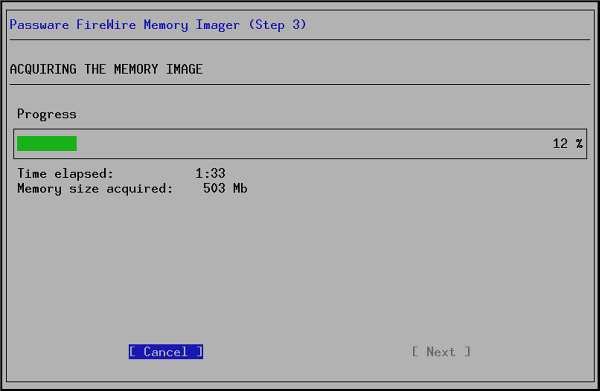
Passware Kit scans the physical memory image file (acquired while the encrypted disk was mounted, even if the target computer was locked), extracts all the encryption keys, and decrypts the given volume. Such memory images can be acquired using Passware FireWire Memory Imager (included in Passware Kit Forensic), or third-party tools, such as ManTech Physical Memory Dump Utility or win32dd.

If the target computer with the encrypted volume is powered off, encryption keys are not stored in its memory, but they could be possibly recovered from the hiberfil.sys file, which is automatically created when a system hibernates.

NOTE: If the target computer is turned off and the encrypted volume was dismounted during the last hibernation, neither the memory image nor the hiberfil.sys file will contain the encryption keys. Therefore, instant decryption of the volume is impossible. In this case, Passware Kit assigns brute-force attacks to recover the original password for the volume.

Overall Disk Decryption Steps

    Acquire a memory image of or take the hiberfil.sys file from the target computer.
    Create an encrypted disk image (not required for TrueCrypt).
    Run Passware Kit to recover the encryption keys and decrypt the hard disk.

Below are the steps to decrypt a hard disk image. Please, refer to Passware Kit Help for the detailed instructions.
Acquiring Memory Image Using Passware FireWire Memory Imager

If the target computer is turned off, but the encrypted volume was mounted during the last hibernation, skip this step. Take the hibefil.sys file from the target computer or its hard drive image and use this file as a memory image for decryption.

Requirements for Memory Acquisition:

    The target computer is turned on and the encrypted volume is mounted.
    Both the target computer and the computer used for acquisition have FireWire (IEEE 1394) ports.
    A FireWire cable.
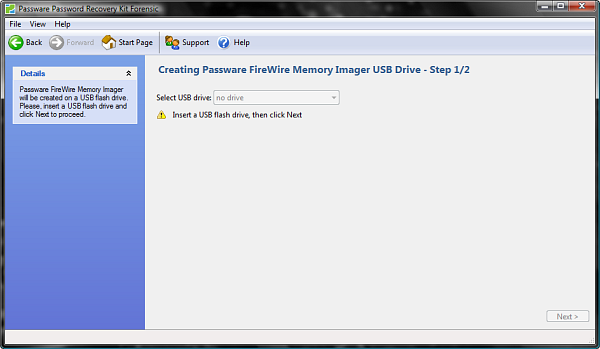
1. On the Passware Kit Start Page click Recover Hard Disk Passwords (or press Ctrl+D), and then click Passware FireWire Memory Imager:
Recover Hard Disk Passwords
The following screen appears:
Create FireWire Memory Imager USB
Insert a blank USB flash drive and click Next.
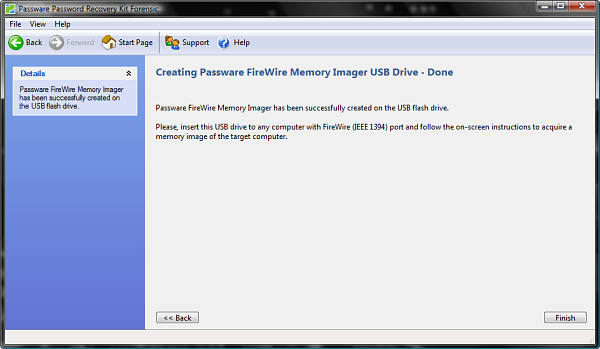
2. Passware Kit copies the necessary files on the USB flash drive. The Passware FireWire Memory Imager USB drive is ready:
Memory-imaging USB Drive Ready
3. Restart your computer.
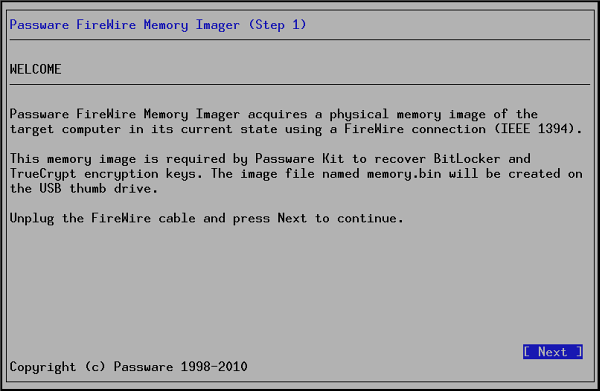
4. Passware FireWire Memory Imager starts: Passware FireWire Memory Imager
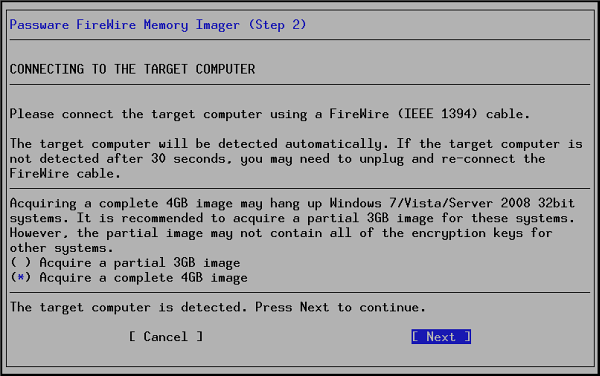
5. Connect the target computer with a FireWire cable. Press Next.
Passware FireWire Memory Imager
6. The memory imaging process starts:
Passware FireWire Memory Imager
7. Unplug the FireWire cable, remove the USB flash drive, and press Reboot to restart your PC.
8. The memory image of the target computer (a memory.bin file) is created on the USB flash drive.

Decrypting the Hard Disk

Passware Kit can work with either a TrueCrypt volume file (.TC, encrypted file container), or with its image. For BitLocker/FileVault2/PGP decryption, Passware Kit works with image files of encrypted disks. Disk volume images can be created using third-party tools, such as Guidance EnCase, Free EASIS Drive Cloning, or DD.
1. Click Recover Hard Disk Passwords on the Passware Kit Start Page. This displays the screen shown below:
Recover Hard Disk Passwords
2. Click on the corresponding encryption type, e.g. BitLocker. This displays the screen shown below:
TrueCrypt
3. Click Browse… and locate the encrypted volume file or its image file.
4. Click Browse… and locate the physical memory image (memory.bin) or the hiberfil.sys file from the computer to which your encrypted volume was mounted. NOTE: If the target computer is turned off and the encrypted volume was dismounted during the last hibernation, neither the memory image nor the hiberfil.sys file will contain the encryption keys. Therefore, instant decryption of the volume is impossible. In this case, switch to “The volume is dismounted” option, and Passware Kit will assign brute-force attacks to recover the password for the volume.
5. For TrueCrypt, FileVault2 and PGP decryption, click Browse… and select the location and name of the destination file (the image of the decrypted volume).
6. Click Next.
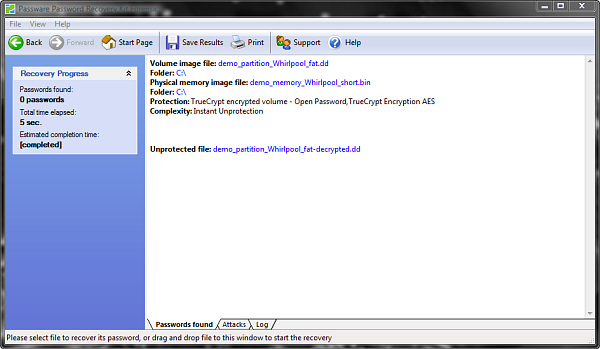
This procedure initiates the decryption process. The decryption might take several minutes depending on the size of the memory image file. The figure below shows a sample result.
TrueCrypt Volume Decrypted
Now you can open your hard disk using the encryption key recovered, or extract an image of the decrypted disk.

Intel® Virtualization Technology for Directed I/O (VT-d): Enhancing Intel platforms for efficient virtualization of I/O devices

Virtualization solutions allow multiple operating systems and applications to run in independent partitions all on a single computer. Using virtualization capabilities, one physical computer system can function as multiple "virtual" systems. Intel® Virtualization Technology (Intel VT) improves the performance and robustness of today's virtual machine solutions by adding hardware support for efficient virtual machines.
Intel® Virtualization Technology for Directed I/O (VT-d) extends Intel's Virtualization Technology (VT) roadmap by providing hardware assists for virtualization solution. VT-d continues from the existing support for IA-32 (VT-x) and Itanium® processor (VT-i) virtualization adding new support for I/O-device virtualization.
Intel VT-d can help end users improve security and reliability of the systems and also improve performance of I/O devices in virtualized environment. These inherently helps IT managers reduce the overall total cost of ownership by reducing potential down time and increasing productive throughput by better utilization of the data center resources.

intel virtualization

Cold Boot Attacks on Encryption Keys

Contrary to popular assumption, DRAMs used in most modern computers retain their contents for seconds to minutes after power is lost, even at operating temperatures and even if removed from a motherboard. Although DRAMs become less reliable when they are not refreshed, they are not immediately erased, and their contents persist sufficiently for malicious (or forensic) acquisition of usable full-system memory images. We show that this phenomenon limits the ability of an operating system to protect cryptographic key material from an attacker with physical access. We use cold reboots to mount attacks on popular disk encryption systems — BitLocker, FileVault, dm-crypt, and TrueCrypt — using no special devices or materials. We experimentally characterize the extent and predictability of memory remanence and report that remanence times can be increased dramatically with simple techniques. We offer new algorithms for finding cryptographic keys in memory images and for correcting errors caused by bit decay. Though we discuss several strategies for partially mitigating these risks, we know of no simple remedy that would eliminate them.